An Apricode product
Store management software that tracks your profit
You know today's revenue. How much of it you actually keep, you only see at the end of the month: stock in one program, the register in another, debts in a notebook. Apricore brings stock, checkout with PRRO (Ukraine's software cash register), money and debts into one workspace, with or without an online store.
Three questions
Three questions, answered every day
- PROFIT
How much did I make? The system remembers what you paid for each delivery and subtracts exactly that cost from the sale. So you see profit on every receipt, not at the end of the month.
Margin by receipt, product and daySales at a loss show up right awayDead stock: money sitting on the shelf
- MONEY
Where's my money? Cash drawers, bank accounts and card terminals in one table. Every hryvnia is tied to a document: where it came from and where it went.
The balance in every drawer and accountCard payments the bank hasn't settled yet, kept separateFree cash, net of overdue debt to suppliersExpenses by category: rent, payroll, stock
- DEBTS
Who owes whom? Every debt is broken down by invoice, with the date it started and how many days it's overdue. With a list like that, the call with a customer is short.
Debtors with due dates, oldest firstWhat you owe suppliers, as a separate listA credit limit stops shipmentsReconciliation statements by period
THE POWER'S OUT
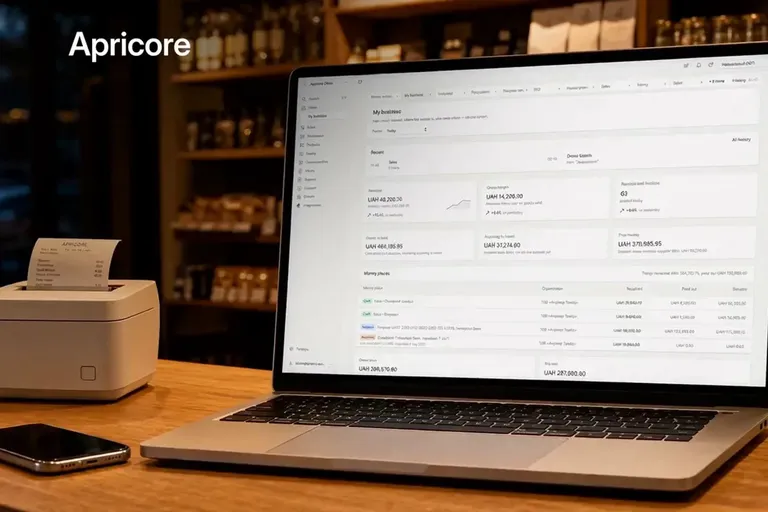
Apricore's server sits in a data center, not in your store's back room. At the store, a laptop with mobile internet and a power bank for the receipt printer are enough.
SALES KEEP GOING
Mobile network down too? The register switches to offline mode on its own. The cashier sees how many hours are left out of 36 in a row and 168 a month. The reserve of backup receipt numbers is visible too. Once the connection is back, the receipts go to the tax service by themselves.
POS with PRRO
From opening float to Z report
Open the shift
The cashier enters the opening float and opens the shift. The fiscal shift in PRRO opens along with it.
Ring up a sale
Scanner, search by name or a weight barcode. Cash, card, split, or on credit for a regular customer. The receipt gets its fiscal number right away.
Take a return
Only with a refund receipt and the original payment method, as the law requires. Paying out cash from the drawer is reserved for a senior cashier.
Close the shift
The cashier counts the cash by denomination, and any discrepancy shows up at once. The Z report is generated at closing.
What's inside
One workspace instead of four apps
Inventory management
- Goods receipts, purchase orders and returns to suppliers
- Transfers between warehouses and locations
- Write-offs with a reason, and stock counts with a discrepancy report
- A history of every stock movement
- The system won't let you sell into negative stock
Costs and prices
- Every delivery keeps its own purchase price
- Shipping and customs duties are included in the cost
- Retail, wholesale and as many custom price types as you need
- Bulk repricing that shows the margin before you post it
- Reminders about batches nearing their expiry date
POS with PRRO
- A full-screen cashier station with a scanner and hotkeys
- Fiscal receipts through Checkbox
- Offline mode with a countdown of hours and backup numbers
- Parked receipts, promo codes and discounts within each role's limits
- Goods sold by weight, and gift certificates
- Cash rounding as a separate receipt line
Multiple FOPs and LLCs
- Each business, whether a Ukrainian sole proprietorship (FOP) or an LLC, has its own cash drawers, accounts and PRRO key
- Annual turnover next to the single-tax limit and the VAT threshold
- The register checks the cash payment limit
- Every document is posted on behalf of a specific business
Reports
- Gross profit with cost and margin
- ABC analysis and inventory turnover
- Dead stock sitting on the shelf, not moving
- What to reorder before it runs out
- File exports for your accountant
Permissions and control
- Built-in roles: owner, administrator, sales manager, warehouse keeper, cashier, senior cashier
- Cashiers can't see purchase prices. They aren't even in the page code
- Only a senior cashier can refund cash from the drawer
- A posted document can't be rewritten, only voided with a trail
- An audit log of who posted or voided what, and when
- Checkbox
- LiqPay
- PrivatBank
- Nova Poshta
- UkrSklad
Online store
A storefront that pulls stock from inventory
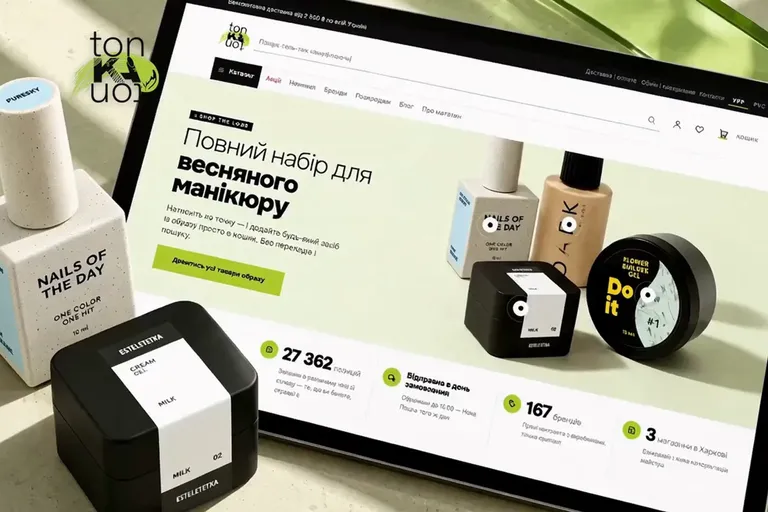
You can take Apricore without a website, just accounting and the register. Or with a storefront. Then the site pulls products, prices and stock from the same inventory, and orders land in the same system. You can see what such a storefront looks like in the tonKAton case study, a professional cosmetics store for nail technicians.
What the storefront gives you
- 01
One stock count for site and register
Sell the last unit at the register, and the site stops offering it. Inventory owns the number, the site only displays it.
- 02
Fiscal receipts for online orders
Card payments on the site and cash on delivery get a fiscal receipt through Checkbox, just like sales at the register.
- 03
Payments and delivery built in
LiqPay, PrivatBank's Payment in Parts, cash on delivery. Nova Poshta with branch pickup, waybills and tracking.
- 04
Search that understands shoppers
Finds products typed in the wrong keyboard layout, in transliteration or by SKU. Alongside it, reviews, wishlists and back-in-stock alerts.
Switching over
Switch from UkrSklad, 1C or spreadsheets
What scares people most about new software is losing their data and a week of sales. That's why you see the discrepancies before anything is moved.
- 01
Export what you have
An Excel or CSV file from UkrSklad, 1C, BAS, Torgsoft or your own spreadsheet. We map the columns to your file.
products · customers and suppliers · prices - 02
See discrepancies up front
A row-by-row report of duplicates, negative stock and products without a purchase price. Nothing is saved until you confirm.
report before transfer - 03
Stock and debts as documents
Opening stock comes in at cost, debts with the date they arose. Negative stock is closed out with a write-off that stays visible in the history.
stock · debts - 04
Re-import without duplicates
Upload the same file a second time and you won't get copies. The system recognizes rows it has already transferred.
no duplicates
Workspace
What Apricore looks like
Real workspace screens, filled with demo data. On the demo we'll show receiving, a sale, a return and debts using examples from your business.
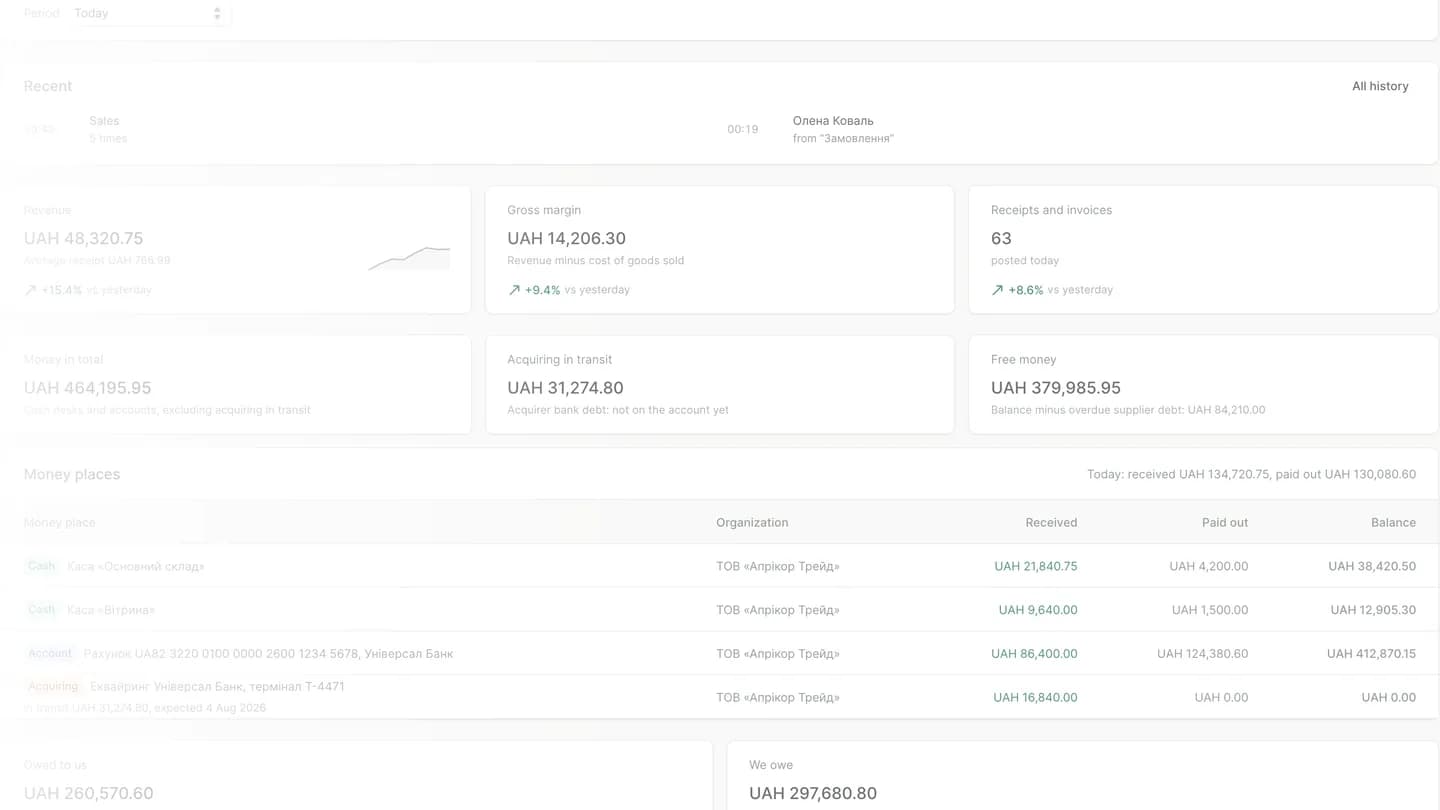
Money, debts and the PRRO offline limit
Balances for every drawer, bank account and card terminal, including card money the bank hasn't settled yet. Alongside are debtors with days overdue, what you owe suppliers and how many PRRO offline hours are left.
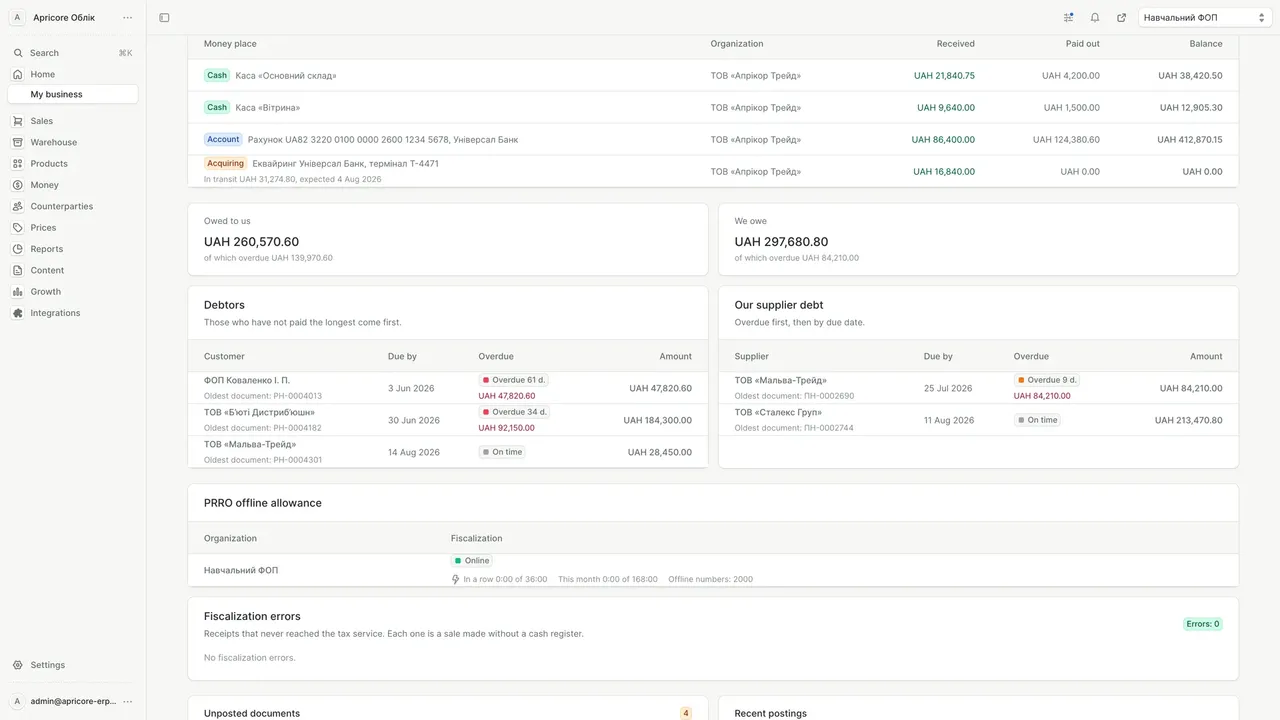
Stock by location, at cost
How much stock sits in each warehouse and location, at what cost and for what total. Goods sold by weight are counted in kilograms, and the value of all stock is shown at the bottom.
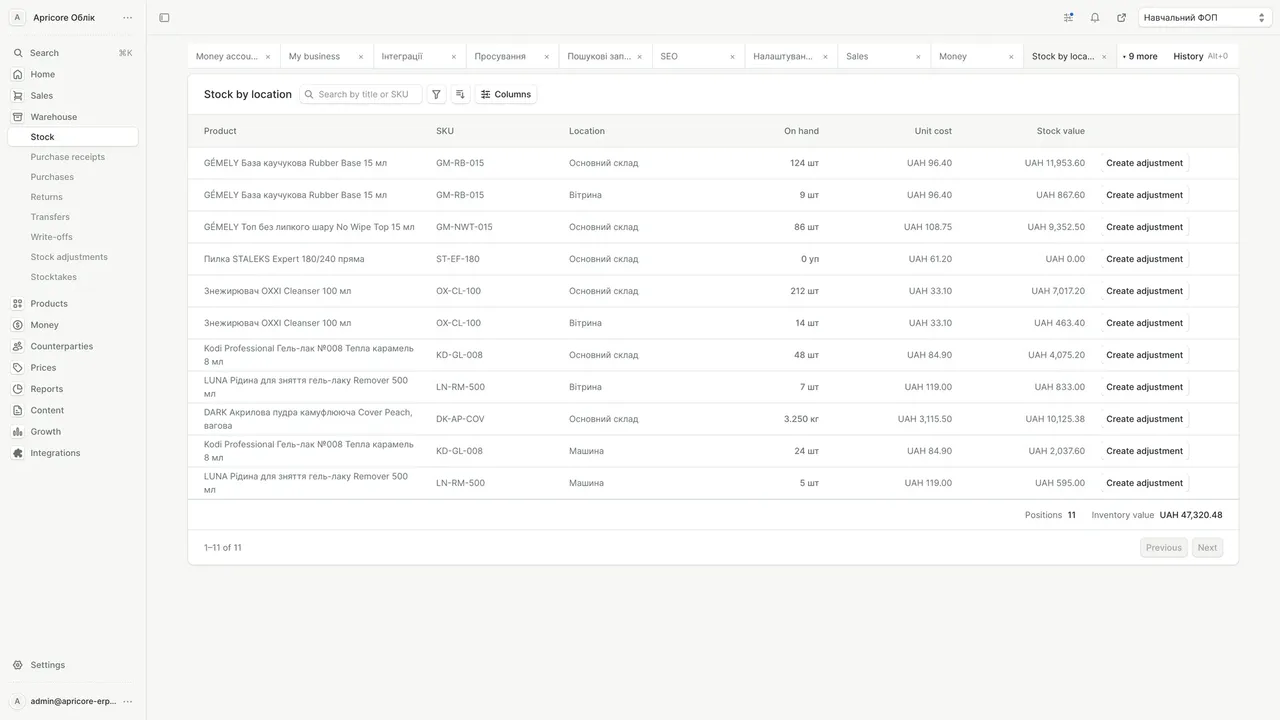
Catalog with stock and import
Products, prices and stock in one table, with out-of-stock items flagged right away. Pick the columns you need and bring products in from a file with the import.
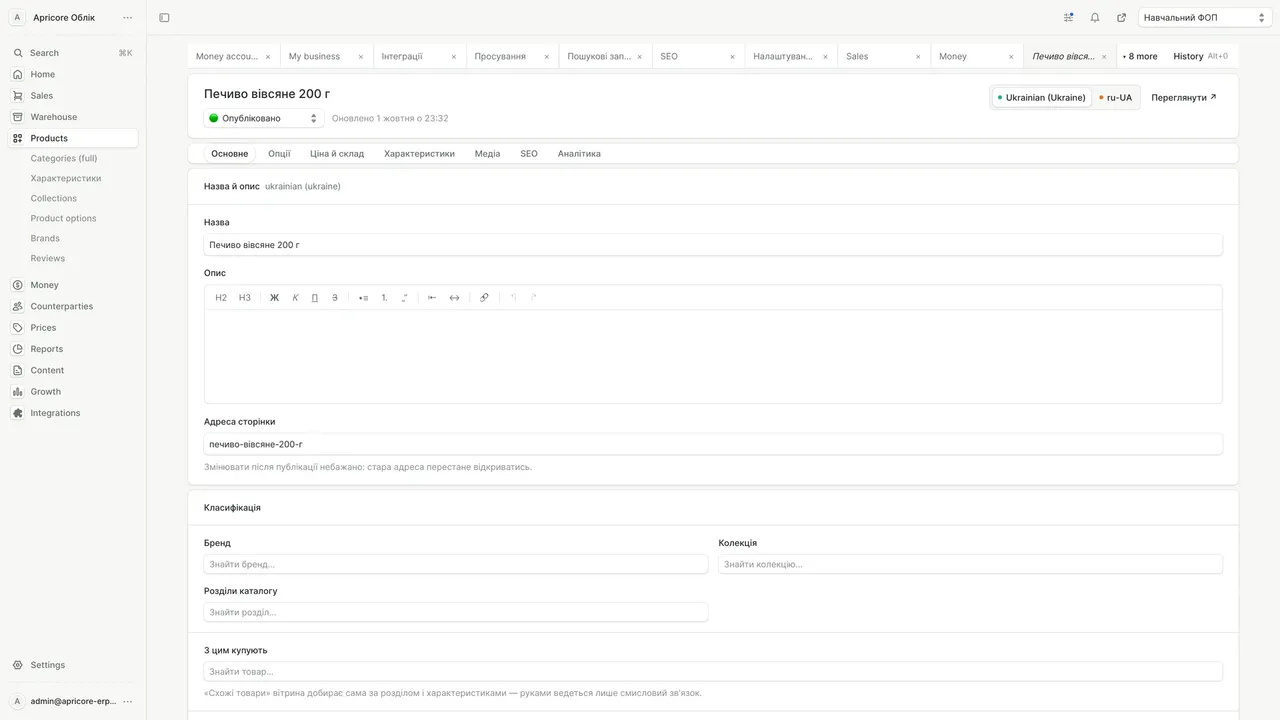
Product card from price to SEO
Price and stock, attributes, photos and SEO live in tabs on a single product card. You keep the name and description in Ukrainian and Russian.
HONEST ABOUT THE LIMITS
BOOKKEEPING STAYS WITH YOUR ACCOUNTANT
Tax returns, VAT invoices and payroll reporting belong in dedicated accounting software. Apricore hands your accountant the data as a file.
A CLOSED MONTH STAYS CLOSED
No one can post a document in a closed period or void one that's included in a signed reconciliation statement.
ONLY A DOCUMENT CHANGES STOCK
You can't fix a number by hand. Every change has an author, a date and a reason.
WE SHOW THE LIMIT, NOT LOOPHOLES
The system shows how much room is left under the single-tax limit. It won't suggest which FOP to move a sale to.
WE TELL YOU THIS BEFORE YOU BUY
HOW BUYING WORKS
SETUP — ONE TIME. UPDATES — BY SUBSCRIPTION
Stop paying, and the system keeps working, just without updates. We don't switch on or charge for modules you don't need. We'll put the price in writing after the demo, once we know how many locations and businesses you have and whether you need a storefront.
FAQ
Common questions about Apricore
Next step
See Apricore handle your workflow
30 minutes, screen to screen. We'll walk through your day: receiving goods, a sale at the register, a return, debts and a report. Want to see your own products? After you submit the request, message us an export of your products and stock on Telegram, and on the demo we'll show you a report on how they'd move over.
- 30 minutesOne-on-one online
- Flexible formatVideo or phone call
- Solution-focusedPractical answers

How to choose
How to choose store management software
Store management software should answer four questions: how much stock is on the shelf, what you paid for it, how much money is in the drawers and who owes whom. If a notebook answers any of them, the software is only doing part of the job. Inventory tracking without cost data shows revenue, not profit.
Inventory management runs on documents
Reliable inventory management changes stock only through documents: receipts, transfers, write-offs, stock counts. Every movement has an author and a date, so a shortage shows up as a document, not as a feeling that "something doesn't add up." When you compare inventory software, ask whether you can edit a stock level by hand. If you can, don't trust the number on the screen.
The second question is cost. Purchase prices change from one delivery to the next, and an average price distorts profit. Batch tracking (FIFO) deducts goods from the delivery they actually came from, shipping and duties included. Warehouse software that can't do this will only show your margin "roughly."
POS with PRRO built into accounting
A cloud POS meets the legal requirement but knows nothing about cost. When the register and the warehouse live apart, you have to piece together the day's profit by hand. For a FOP, PRRO works better inside the accounting system: the receipt deducts stock, the money lands in the drawer, and the cashier sees the offline limit on screen.
1C and BAS alternatives for retail
If you're looking for a 1C alternative, split the job in two first. Bookkeeping and tax reporting are your accountant's work in dedicated accounting software. Management accounting for a store (stock, prices, register, debts, profit) is the owner's daily work. A good 1C replacement for a store handles the second job and hands the accountant the data as a file. Before you switch, ask for a discrepancy report: duplicates, negative stock, products without a purchase price.
ERP for small business, minus the bloat
ERP sounds like a year-long project. A small business with a few FOPs and locations needs less: separate drawers and accounts for each business, the single-tax limit in plain view, and roles that keep purchase prices hidden from cashiers.
What to check in any software demo
- Can you see profit on a specific receipt, not just revenue?
- Can stock be changed without a document?
- What does the cashier see, and can they refund money without a senior cashier?
- Where can you see how many offline hours are left?
- How do stock and debts move over from your current software?
- Who owns the database, and what happens if you stop paying?
Who Apricore is for
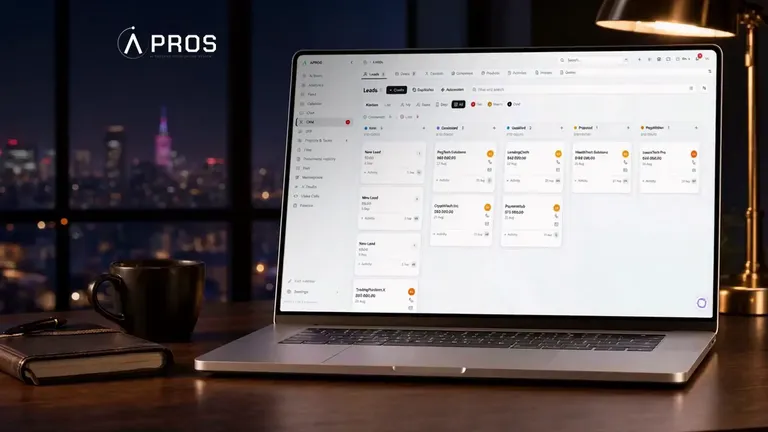
Apricore is store management software for retail and wholesale. It handles stock, costing, the PRRO register, money and debts, plus an online store if you need one. It doesn't cover manufacturing with bills of materials. If you need accounting built around a non-standard process, that's a job for custom CRM and ERP development. We build turnkey online stores as a separate service, and sales and leads live in our Apros CRM.